Open Rewards: Shop Local
A new way to support your favorite local businesses!
Castle Pines is happy to support Castle Pines businesses with a shop local rewards program: Open Rewards. With Open rewards, you can earn 5% rewards on your purchases from Castle Pines businesses. Rewards can then be redeemed at any other business that is a part of the program. How it works:
- Earn rewards for every dollar spent at participating businesses.
- Re-invest rewards in another local business, ensuring local dollars stay within the community.
Questions about the program? Contact Charli.Smith@CastlePinesCO.gov.
How to participate in the program:
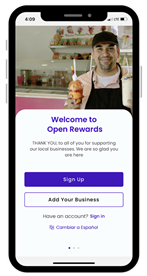
Step 1 - Sign up
Download the app and create your free account.


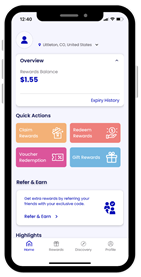 Step 2 - Earn Rewards
Automatically earn 5% back on purchases at participating local businesses. Rewards are sponsored by the City of Castle Pines to incentivize local spending.
-
-
-
-
- To find participating businesses, select the "Claim/Redeem" tab on the home page or navigate to the "Discover" page.
- If you have linked your credit card, the rewards will process automatically. Otherwise, upload a photo of the receipt and enter the transaction amount. Once verified, rewards will be in your "Rewards Balance."
-
-
-
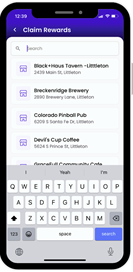 Step 3 - Redeem Rewards
Rack up the rewards and use them at any other participating businesses around town.
-
-
-
-
- To redeem your rewards, make a purchase in full at any participating business.
- Select the "Claim/Redeem" tab on your home screen, click the "Redeem" tab, and find the business that you visited.
Enter the amount of rewards you would like to redeem towards this purchase and take a photo of the receipt. Once validated, you will receive your redemption via your selected payout method (Venmo, PayPal, or Check).
-
-
-
Frequently Asked Questions
Is the app free?
Yes, you can download the app and create a free account on Google Play or the App Store.
How many rewards do I receive per purchase?
The rewards are currently set to 5% per purchase, with a maximum reward of $5 per transaction and $50 per person per year. If the percentage has changed, it will be displayed within the business information in the "Discovery" tab.
I have money in my rewards balance. How do I take it out/use it for shopping?
Your rewards can be applied to a future purchase at any of the listed businesses in Castle Pines. For example, let's say you earned $5 from going to a restaurant, you can then redeem the $5 towards a coffee, pastry, etc., at any listed small business in Castle Pines. To do that, click "Redeem" from your home screen, select the business you shopped at, and submit the receipt or select your linked bank transaction. Once processed, you'll receive the cash out via your selected payout method. For more instructions, please see https://www.bludot.io/redeem-rewards
What do I do if I made a purchase at a participating business and it is not appearing in my apps transactions?
For this issue, you will need to reach out to Technical Support via Bludot. Technical Support can be reached by clicking "Contact Support" in the Profiles tab. Simply enter your concern or question and press submit. A representative from Bludot will respond shortly.
Am I required to provide my bank account information?
No, Open Rewards gives you two options to claim rewards. You can either link your bank account for automated rewards, or you can upload a photo of the receipt as proof of purchase.
My Claim request has been approved but Redeem request is still pending.
Claim requests and Redeem requests are processed in different queues so you may see a little difference in timing. Kindly stay tuned.